How Fellow's Data Retention Settings Give Compliance Teams The Flexibility They Need
•
5
MIN READ

AI Summary by Fellow
Every meeting your organization runs produces something valuable: decisions made, commitments given, context shared. But in regulated industries like financial services, healthcare, legal, and others, that same meeting record can also represent a liability. Verbatim recordings and transcripts sit at the intersection of operational value and regulatory risk, and the longer they're retained, the more exposure a firm carries.
Fellow is purpose-built for this reality. It doesn't ask compliance teams to choose between capturing meeting intelligence and managing their data obligations. Instead, it gives them the controls to do both on their terms, enforced automatically across the entire organization.
This post walks through how Fellow's data retention settings work, how to configure them, and the flexibility these settings offer legal and compliance teams trying to align data handling with their firm's specific regulatory posture.
How to Configure Fellow's Data Retention Settings
Fellow's retention architecture is governed at the workspace level, which means a compliance or IT administrator sets the rules once and they apply uniformly across the entire organization: every team, every meeting type, every business unit. There is no need for individual users to manage their own settings, and no risk of policy drift from team to team. Here’s how to configure Fellow’s data retention settings within your account:
Set retention for recordings
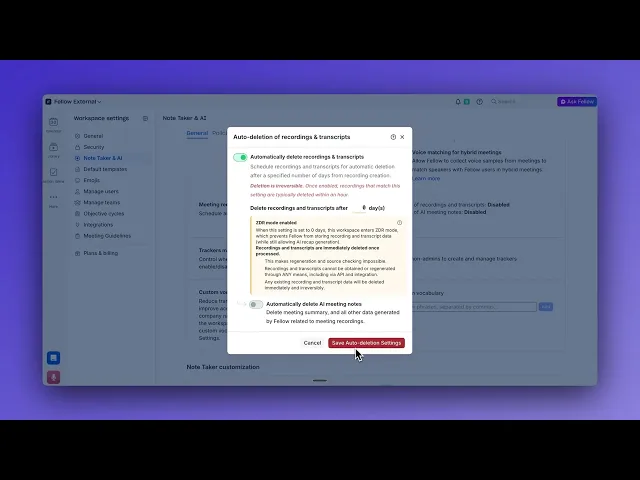
In Workspace Settings, under Content & Retention, then Auto-deletion, an administrator turns on Auto-delete recording and chooses how many days recordings are kept, anywhere from 0 days up to five years. This covers both video and audio. At 0 days, the recording is deleted as soon as Fellow finishes processing the meeting.
Set retention for transcripts
Auto-delete transcript works the same way, with its own window from 0 days up to five years, and deletes the transcript along with its speaker labels. Because it is independent of the recording setting, a firm can delete video right after processing while keeping a searchable transcript, or remove the verbatim text while keeping the recording. A firm that must retain records for a defined period can enter any number of days for each, such as 60, 90, or 365, up to five years.
Set retention for AI-generated notes
Auto-delete AI Notes deletes the AI meeting notes and everything Fellow generated from the recording, including summaries and action items, after a window from one day up to five years. Because these notes are produced from the recording and transcript, this setting is only available when recordings and transcripts are also set to auto-delete, and the notes are never deleted before the content they were generated from. With it turned off, AI notes stay in Fellow for as long as the firm needs them.
Turn on zero-day retention
Setting both recordings and transcripts to 0 days gives full zero-day retention: Fellow generates the AI notes first, then deletes the recording and transcript immediately after processing, while the summary, decisions, and action items remain. Zero days can also be applied to just one of the two.
If a change would remove content the workspace keeps today, Fellow shows exactly what will be deleted before the setting is saved. Workspaces that already had auto-deletion turned on keep the same retention period, now applied to both recordings and transcripts.
This separation is intentional and important. It means the recording, the verbatim transcript, and the AI summary derived from them do not have to share a retention schedule. Each is governed by its own setting.
How Zero-Day retention works in Fellow
Zero-day retention, or ZDR, is Fellow's most protective data handling configuration. It is designed for firms that need the output of a meeting, such as the summary, the key decisions, and the action items, but cannot afford to retain the underlying recording or verbatim transcript beyond the moment it has served its processing purpose.
Zero-day retention is not on by default. A workspace admin turns it on by setting recordings, transcripts, or both to 0 days.
Here is what happens when a workspace uses ZDR:
The meeting gets recorded
Fellow records, processes, and generates AI meeting notes, summaries, and action items from the transcript of the call. Then, immediately upon processing, the source recording, the raw transcript, or both are permanently deleted, depending on what the workspace has set to zero days. Not archived. Not flagged for future review. Deleted. This process applies to both video and audio-only recordings.
The AI-generated outputs remain intact and accessible to the team
While the most important elements of the meeting remain, the compliance liability, such as the verbatim record that would be subject to discovery, litigation hold, or regulatory review, is gone. This is what makes ZDR the most defensible posture available within Fellow. The intelligence from the meeting is preserved exactly where it is useful: in the summary, the follow-ups, the documented decisions. The raw material that creates legal exposure is eliminated at the point of origin.
Deletion is permanent and irreversible
It is worth being clear about what "deleted" means in Fellow's architecture. All deletion is permanent and irreversible. This is by design. A soft delete or an archival process that can be reversed does not carry the same compliance weight as a true and auditable removal. When Fellow deletes a recording under ZDR, it is gone, and that finality is precisely what makes the setting meaningful for compliance teams working under strict data governance requirements.
Does Fellow delete transcripts automatically?
Only when a workspace admin turns it on. Transcript auto-deletion, including zero-day retention (a transcript period of 0 days), is an admin-configured setting under Workspace Settings, Content & Retention, Auto-deletion. Fellow does not delete transcripts immediately after AI processing unless an admin has set the transcript period to 0 days.
A team that must keep records can leave auto-deletion off or enter any number of days up to 5 years. A team that wants the verbatim record gone can set recordings, transcripts, or both to 0 days. Fellow generates the AI notes first, so the summary, decisions, and action items remain.
The flexibility retention policies give compliance and legal teams
The most significant capability Fellow's retention architecture provides is what is best described as the decoupled retention model. Recordings, transcripts, and AI-generated outputs are treated as three distinct data types, each with its own configurable lifecycle. This matters enormously for firms operating under regulatory constraints.
Eliminating liability while preserving institutional memory
In practice, the decoupled model lets a firm do something that would otherwise require a difficult tradeoff: delete raw recordings on the compliance schedule that minimizes discovery exposure, while retaining AI summaries for as long as the firm needs them as a record of decisions and commitments. The verbatim transcript, which is the data type that carries the most regulatory weight, can be eliminated immediately or after a short defined window. The structured, processed output, such as the meeting notes, action items, summaries, can live in the system for years, serving as institutional memory without carrying the same compliance liability.
For firms navigating broad discovery exposure, this distinction is material. A processed summary that captures what was decided is categorically different from a recording of what was said, and Fellow's retention architecture reflects that distinction in the controls it provides.
Governance that scales automatically
Beyond the specific configurations available, the workspace-level governance model itself is a meaningful capability for compliance teams. In large organizations with many teams and meeting types, the alternative to centralized enforcement is policy fragmentation: individual teams managing their own settings, inevitably inconsistently. Fellow eliminates that risk. The compliance team defines the retention rules once, and those rules are enforced uniformly and automatically at scale.
This also means that when a firm's regulatory obligations change, such as a new rule comes into effect, a litigation hold is imposed, or an internal policy is updated, the compliance team can update the workspace settings and have the new policy apply immediately across the entire organization, without having to coordinate with individual team administrators or retrain users.
A posture built for regulated industries
Fellow's data retention settings reflect a broader design philosophy: that regulated firms should not have to compromise between capturing the value their meetings produce and managing the obligations that come with data retention.
The intelligence that meetings generate, the clarity on direction, the record of commitments, the context for future decisions, is real and worth preserving. However, the compliance liability that comes with retaining verbatim recordings indefinitely is also real, and worth managing carefully.
Fellow gives compliance and legal teams the controls to handle both without forcing a choice between them.
Record, transcribe and summarize every meeting with the only AI meeting assistant built with privacy and security in mind.


